CLUBPK Game
New to ClubPK, or stuck on one step? This guide walks you through the whole journey in order. It starts with installing the Android app and opening your account. Then it covers adding money through Easypaisa or JazzCash, finding your way around the game sections, and cashing out. Everything is explained in simple language, with the real limits and timings you can expect. Read it from top to bottom, or jump to the section you need.

What Kind of Platform Is ClubPK?
ClubPK is an online gaming platform built for players in Pakistan. Rather than spreading games across several apps, it keeps them all inside one Android app, so one login gives you access to slots, crash games, casino tables, fishing games and more.
The app’s home screen has four quick shortcuts: Services, Cashback, Withdraw and Deposit. Below them, a sidebar lets you switch between game sections. A bottom bar links to Home, Promotion, Reward and Account. Once you know these areas, you can find almost anything in a couple of taps.
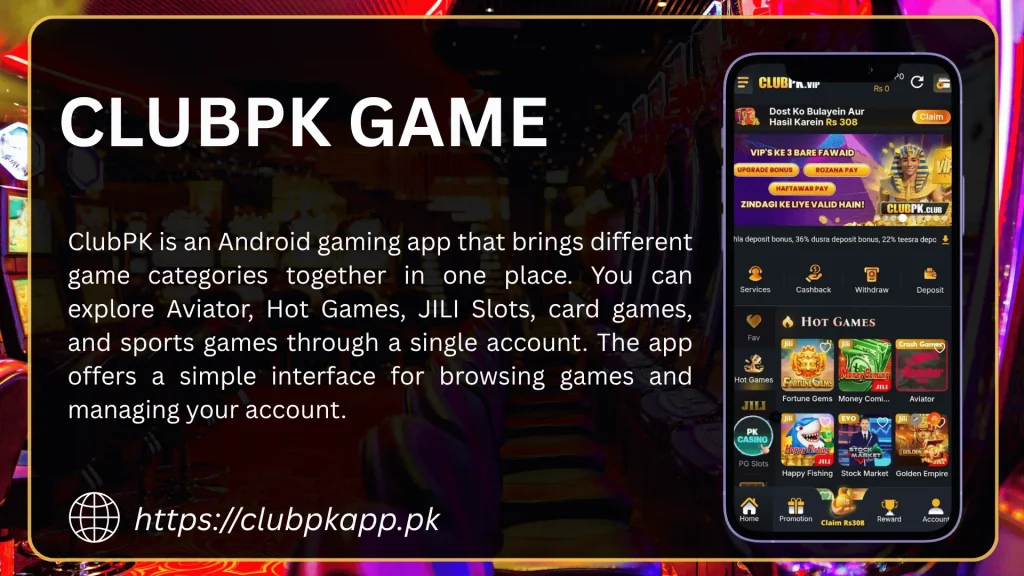
Getting the ClubPK App on Android
The app is not installed from an app store. Instead, you Download an APK file and install it yourself. The process is simple, but where the file comes from matters a lot.
Download Steps
- Open your phone’s browser and visit the official ClubPK download page on clubpk.io.
- Look at the address bar and make sure the spelling is correct before you tap anything.
- Tap the download button and let the file finish completely.
- Open the file from your notifications or your Downloads folder.
Install Steps
- When Android shows a permission message, allow your browser or file manager to install apps. On many phones this is called “Install unknown apps.”
- Return to the file and tap Install.
- Tap Open once the installation is complete.
- Optional: switch the install permission off again afterwards for extra safety.
Menu names can look a little different on Samsung, Infinix, Tecno, Xiaomi and other brands, but the idea is the same everywhere.
If Something Goes Wrong
- Download will not start: Your browser may be blocking the file. Check its download list and site settings, then try again.
- Download stops halfway: Your connection probably dropped, or battery saver paused it. Keep the screen on and start a fresh download.
- “App not installed” message: Free up storage. If an older ClubPK copy came from somewhere else, remove it first.
- “Problem parsing the package”: The file is damaged or incomplete. Delete it and download it again on a steady connection.
Creating and Accessing Your ClubPK Account
Opening a New Account
- Launch the app and pick the register option.
- Fill in each field the form shows, and check your spelling carefully.
- Choose a password you have never used for email, banking or social media.
- Finish any verification step the app shows.
- Submit the form, and your account is ready.
Signing In
- Open the app and choose the login option.
- Type your username and password.
- Complete verification if the app asks for it.
- Tap to sign in, and your balance appears at the top of the home screen.
Forgot Your Password?
Use the recovery option on the login screen, if one is shown, and follow its instructions. The exact method can vary, so always go by what the official screen tells you. Once you are back in, set a completely new password.
Keeping Your Account Yours
- Your password and any verification code belong to you alone. Genuine support staff never need them.
- Do not save your login on cyber café computers or a friend’s phone.
- Log out when other people use your device.
- Keep a screen lock on your phone and install system updates.
- Never type your login details into an app or page you are not sure about.
Settings That Make the App Easier
Language choice: The app can display its menus in more than one language. Reading withdrawal forms and offer conditions in a language you are fully comfortable with helps you avoid expensive mistakes.
Dark and light display: Dark mode is easier on the eyes at night. Light mode is clearer in daylight. Switch whenever your surroundings change.
Favourites: Tap the heart on any game tile to save it under Fav, so the games you use most are always one tap away.
Game Sections Inside ClubPK
The sidebar splits the game library into clear groups. Here is what each one holds.
Hot Games
This is a featured shelf picked by the platform, mixing titles from different providers. It is a handy starting point, but a featured game does not pay better than any other.
JILI Slots
Reel-based slot games from the JILI studio. Each spin is random and separate from the last, so no slot is ever “due” to pay.
PG Slots
Slots from PG Soft (Pocket Games Soft), each with its own theme and bonus features. Check a game’s rules and payout information before you spin.
Slots
A wider slot collection from other providers, useful when you want to compare more titles side by side.
Crash Games
Fast rounds where a multiplier climbs until it suddenly stops. Aviator is the best-known example, and similar games sit in the same group. You choose when to cash out. If the round ends first, the stake is lost. The stopping point is random, and no “signal” group or pattern can predict it.
Casino and Card Games
Table-style and card games, including familiar formats such as Andar Bahar. Games that look alike can still use different rules, so read each one separately.
Fish Games
Arcade-style shooting games with their own rules and payout tables.
Sports
Sports-linked options that change with the match calendar, especially during major cricket events. No team form or tip can promise a result.
Game Providers
The app lists games from providers including Pragmatic Play, Evolution, PG Soft, Playtech, Yggdrasil, NetEnt, CQ9, Play’n GO, JILI, BNG, AG, Allbet, JDB, SBOBET, CMD368 and Dream Gaming. Provider names belong to their respective owners.
Promotions and Rewards
The Promotion tab in the app lists current offers. They usually fall into these groups:
- Deposit bonuses: Extra credit linked to a first, second or later deposit.
- Daily and weekly offers: Rewards tied to regular activity.
- Referral programme: Rewards when people you invite sign up and meet the programme’s conditions.
- VIP and level benefits: Perks that grow as your account level rises.
- Cashback and rebates: A small share of activity returned under set rules.
Understand Turnover Before You Accept
Many offers come with a turnover requirement. This means you must play through a set amount before withdrawing. The withdrawal screen shows how much turnover is still remaining and for which game types. If this number is not zero, your withdrawal may not go through yet.
Before accepting any offer, ask yourself:
- How much turnover does it need?
- Which games count toward it?
- Is there a time limit?
- Does the offer fit the budget I already planned?
If the answer to the last question is no, skip the offer. A bonus never improves your chances of winning.
Adding Money: ClubPK Deposits
- Tap Deposit on the home screen.
- Pick JazzCash or Easypaisa.
- Choose one of the payment channels shown.
- Tap a preset amount or type your own. The allowed range appears in the amount box.
- Pay from your wallet exactly as the on-screen instructions say.
- Confirm, and keep the wallet receipt until your balance updates.
Most deposits show up within 10 seconds to a minute. Network slowdowns, a mistyped reference or wallet maintenance can occasionally stretch this.
Golden rule: Only follow the payment details shown inside your own account. Numbers passed around in WhatsApp groups or old screenshots may no longer be correct.
Cashing Out: ClubPK Withdrawals
- Tap Withdraw on the home screen.
- Link your e-wallet if you have not done so already. The app lets you add up to two wallets.
- Check your available amount and any remaining turnover.
- Enter an amount between 100 PKR and 50,000 PKR.
- Review the details carefully, then submit.
- Track the request in your transaction records.
Most requests are paid within about 1 to 20 minutes. When Easypaisa, JazzCash or another wallet network is under maintenance, payouts can take roughly 20 minutes to 1–2 hours. A slow request during maintenance is usually just waiting in line. It has not failed.
When a Payment Gets Stuck
A deposit is pending:
- Check your transaction history and your balance.
- Confirm the amount and reference number match your receipt.
- Do not send a second payment to “push” the first one through.
- If it stays pending well beyond a few minutes, contact support.
A withdrawal is pending or failed:
- Make sure your linked wallet details are correct.
- Check whether turnover is still remaining.
- Consider possible wallet maintenance.
- Avoid submitting the same request again and again.
- Contact support if it passes the expected time.
Will payments get my wallet blocked? A normal deposit or withdrawal does not by itself cause a wallet or account ban. Use only your own wallet, avoid unusual or third-party transactions, and follow your wallet provider’s rules. If your wallet provider places a restriction, only that provider can lift it.
Getting Help from ClubPK Support
ClubPK Game offers live chat support. Tap Services on the home screen, enter your game username when asked, and describe the problem.
To get a faster answer, send these details in your first message:
- Your game username (never your password)
- Transaction or reference number
- Amount, wallet used, and date and time
- A screenshot of the receipt or error
- A one-line summary of the problem
App Updates and Maintenance
APK apps do not always update by themselves. If the app starts misbehaving, compare the version in your phone’s app info screen with the one on the official download page, and install the newer file if yours is older. Your account is stored on the platform, so updating the app will not erase it.
Maintenance can happen on ClubPK’s side or on the wallet networks. It mostly affects payment timing, not your balance.
Staying Safe from Fakes and Scams
Be suspicious of anything that promises more than a normal app can deliver:
- APKs labelled “mod,” “hack,” “unlimited coins” or “guaranteed win”
- Download links sent by strangers in groups
- “Agents” who ask for your password, verification code or wallet PIN
- Anyone who asks you to pay a fee to “unlock” your account or withdrawal
- Messages that pressure you to act immediately
If you installed a questionable file, uninstall it, change your password from the official app, and tell your wallet provider if you entered wallet details anywhere.
Play Within Your Limits
ClubPK is entertainment for adults, not a way to earn a living. Every result is random, and losing money is a real possibility.
- Decide your spending limit before you open the app, and treat that money as already spent.
- Use only spare money. Never touch rent, bills, school fees or family money.
- Never borrow from people or loan apps to play.
- Set a time limit with a phone alarm, and take breaks.
- After a loss, stop for the day instead of chasing it.
- Watch for warning signs such as hiding your play, feeling restless without it, or letting studies, work or sleep slip.
If it feels hard to stop, talk to someone you trust or a qualified counsellor. Stepping away completely is always an option.
Only use online gaming services that are legal where you live.
Things to Keep in Mind
What works well
- One app covers slots, crash, casino, fish and sports sections.
- Familiar local wallets for both deposits and withdrawals.
- Low 100 PKR minimum for both deposits and withdrawals.
- Quick shortcuts for deposits, withdrawals and support on the home screen.
What needs care
- The APK must come from the official source.
- Offers usually carry turnover conditions.
- Payout times can stretch during wallet maintenance.
Conclusion
ClubPK puts a large game library, local wallet payments and in-app support into one Android app. The smart way to use it is simple: install only the official APK, protect your login, read offer conditions before accepting them, and keep your receipts. Decide your limits before every session, and ClubPK stays what it should be: entertainment on your own terms.
Frequently Asked Question
The app is provided as an APK file for Android. Download it only from the official ClubPK download page.
You can start with 100 PKR through Easypaisa or JazzCash.
Usually within 10 seconds to 1 minute, though delays can occasionally happen.
Up to 50,000 PKR per request. This is not a daily cap, and more than one request is allowed in a day under the platform’s rules.
Wallet maintenance on Easypaisa or JazzCash can extend payouts to around 1–2 hours. Unfinished turnover or wrong wallet details can also hold a request.
It shows how much play is still needed under an offer’s conditions before you can withdraw.
The withdrawal screen allows up to two linked e-wallets.
Tap Services on the app’s home screen to open live chat, then enter your game username.
Message support straight away with the correct reference number and your receipt. Do not send another payment.
No. Treat any such request as a possible scam, and never share your password or codes.
Hot Games, JILI Slots, PG Slots, Slots, Crash Games, Casino, Fish and sports-linked options. Sections can change with updates.
No. Your account is stored on the platform, not on your phone.